
Password-based replication binds work, but they leave long-lived credentials in agreement configuration and changelog traffic still depends on transport security you configure separately. Certificate-based authentication lets each supplier prove its identity with the TLS server certificate already in its NSS database. The receiving replica maps that certificate to a directory service account and checks membership in a replication bind group before it accepts updates.
This guide replaces SIMPLE replication binds with SSLCLIENTAUTH between an authoritative supplier and a newly installed peer. You export public certificates, store them in userCertificate, configure certmap.conf, authorize a bind group, bootstrap the empty peer with temporary credentials, then create final LDAPS agreements that do not carry a replication password. Every command in the walkthrough uses LDAPS URLs; StartTLS is a valid alternative but is not exercised here.
Before you start:
- Configure TLS, STARTTLS, and LDAPS on every replica
- Manage, renew, and back up certificates — NSS trust flags and CA import
- Configure multi-supplier replication — supplier roles, replica IDs, and bidirectional agreements after this guide
- Manage replication agreements —
repl-agmtcreate, init, and status - Client certificate authentication — general
certmap.confsyntax and SASL EXTERNAL (this guide covers replication identities only)
userCertificate, certmap.conf, the replication bind group, temporary bootstrap credentials, and SSLCLIENTAUTH agreements. It does not cover TLS installation, general client-certificate login, offline reinitialization, changelog encryption, or full multi-supplier topology planning — those topics have dedicated chapters linked above.
Tested on: Rocky Linux 10.2; 389 Directory Server 3.2.0.
How certificate-based replication authentication works
When a supplier pushes changes, it opens a TLS-encrypted connection to the peer, presents its Directory Server certificate during the handshake, and authenticates with SSLCLIENTAUTH instead of a bind password. Mutual TLS means the receiving replica validates the client certificate chain and maps the presented identity to a directory entry before it accepts replication updates.
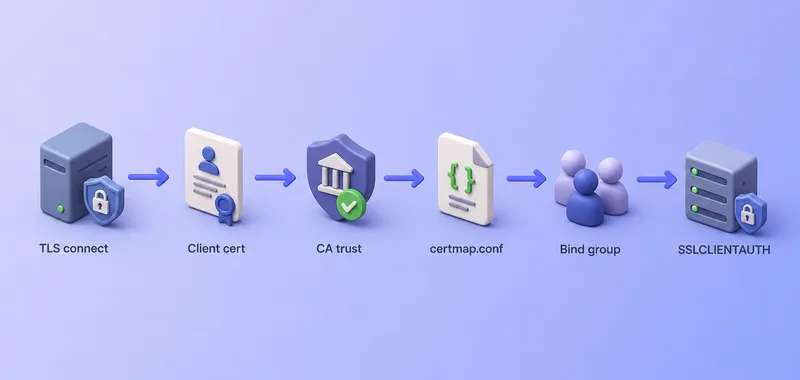
The diagram is a logical sequence, not a protocol specification. During the TLS handshake the sending supplier presents its Server-Cert; the receiving replica validates the chain, maps the certificate through certmap.conf, and checks bind-group membership before it accepts replication updates.
Authentication and transport are separate concerns:
- The certificate,
certmap.conf, and replication bind group identify which service account may supply updates. - LDAPS or StartTLS still encrypts replication traffic —
SSLCLIENTAUTHreplaces the bind password, not transport security.
This workflow does not export the private key. Only the public DER certificate is stored in the directory userCertificate attribute on the matching service account. Backup and certificate-management procedures may export keys separately when you explicitly choose that path.
The same model secures supplier-to-consumer and hub-to-consumer agreements once service accounts, mapping, and bind-group authorization exist on every participating replica.
Lab environment and prerequisites
This walkthrough starts from an authoritative supplier (ldap1) that already holds dc=example,dc=com, plus a second host where instance ldap2 is installed, TLS-enabled, and uninitialized for replication. The peer has no replication role, no agreements, and an empty suffix database before phase 3.
| Setting | Supplier 1 (authoritative) | Supplier 2 (new peer) |
|---|---|---|
| Hostname | ldap1.example.com |
ldap2.example.com |
| Instance | ldap1 |
ldap2 |
| Replica ID | 1 (already assigned) |
2 (assigned during bootstrap) |
| LDAP / LDAPS | 389 / 636 |
1389 / 1636 |
| Service account | cn=ldap1,ou=services,dc=example,dc=com |
cn=ldap2,ou=services,dc=example,dc=com |
| Outgoing agreement | ldap1-to-ldap2 |
ldap2-to-ldap1 |
Shared values:
- Suffix:
dc=example,dc=com - Bind group:
cn=replication-servers,ou=Groups,dc=example,dc=com - Directory Manager password: the lab uses the same password on both hosts in mode-
600files at/root/dm.pw. In production, use separate files such as/root/ldap1-dm.pwand/root/ldap2-dm.pw.
Before you create agreements, confirm the starting state on ldap2:
dsconf -y /root/dm.pw ldap2 repl-agmt list --suffix "dc=example,dc=com"No output is expected when no agreements exist yet. Also confirm that ldap1-to-ldap2, ldap2-to-ldap1, and ldap1-to-ldap2-bootstrap do not already exist on either host.
Each server certificate must include every agreement --host value in its CN or SAN. This lab uses ldap1.example.com and ldap2.example.com in both DNS and certificate subjects so nsslapd-ssl-check-hostname validation succeeds during outbound replication.
Confirm name resolution on both servers. getent ahostsv4 can return several records per hostname; print the first IPv4 STREAM address for each:
for host in ldap1.example.com ldap2.example.com; do
  getent ahostsv4 "$host" | awk '/STREAM/ && !seen[$1]++ {print $1, $3; exit}'
done
Sample output:
192.168.56.108 ldap1.example.com
192.168.56.109 ldap2.example.com
Each server must already have:
- Working LDAPS between the peers
- A server certificate and private key in its NSS database, with SANs that cover the agreement hostname
- Trust for peer issuing CAs used during replication
- Certificates exportable in DER format for
userCertificate - Organizational units
ou=services,ou=Groups, andou=Peopleunderdc=example,dc=com(create them in the next section if they do not exist)
Do not repeat TLS issuance or NSS database creation here — follow TLS configuration and certificate management first.
Walkthrough phases
The procedure below follows four phases on the authoritative supplier first, then both peers:
| Phase | What you configure | Where |
|---|---|---|
| 1 | Export certificates, peer CA trust, service accounts, userCertificate |
Authoritative supplier (ldap1) |
| 2 | certmap.conf, nsslapd-certmap-basedn, replication bind group, suffix bind-group setting |
ldap1 first, then each peer instance locally |
| 3 | Temporary replication manager and SIMPLE/LDAPS bootstrap agreement | Bootstrap from ldap1 to the new peer (ldap2) |
| 4 | Create SSLCLIENTAUTH agreements, verify bidirectional replication, decommission bootstrap |
Both suppliers |
Phase 3 exists because certificate mapping cannot run on an empty replica. Bootstrap replication copies service accounts, userCertificate values, and the bind group into the peer database. It does not copy certmap.conf — that file lives under /etc/dirsrv/slapd-<instance>/ on each host and must be configured locally on every instance that receives certificate-based replication binds.
ldap2). If replication already runs with password-based SIMPLE binds, create the service accounts, certificates, and bind group on the authoritative supplier first, configure certmap.conf on every peer, confirm directory data has replicated, then replace one agreement direction at a time with SSLCLIENTAUTH and verify before you remove password-based agreements or replication-manager passwords. Skip phase 3 when the peer database already contains the certificate identities.
Prepare certificate identities and peer trust
Each supplier presents its Server-Cert when acting as a replication client. On ldap1.example.com, export the certificate, convert it to DER, and inspect the fields certmap.conf will use:
certutil -L -d /etc/dirsrv/slapd-ldap1/ -n Server-Cert -a -o /root/ldap1-server.pemopenssl x509 -in /root/ldap1-server.pem -outform DER -out /root/ldap1-server.derThe DER conversion exits silently on success.
openssl x509 -in /root/ldap1-server.der -inform DER -noout -subject -issuer -dates -ext subjectAltName -fingerprint -sha256Sample output:
subject=C=AU, ST=Queensland, L=389ds, O=testing, GN=6d6a490c-bebd-41c4-8552-20cb270367ed, CN=ldap1.example.com
issuer=C=AU, ST=Queensland, L=389ds, O=testing, CN=ssca.389ds.example.com
notBefore=Jul 15 08:12:48 2026 GMT
notAfter=Jul 15 08:12:48 2028 GMT
X509v3 Subject Alternative Name:
    DNS:ldap1.example.com
sha256 Fingerprint=5B:FB:A1:1A:AC:D1:7A:DA:E7:50:FB:8B:C4:BB:5C:DE:86:C7:A8:97:C5:3A:00:11:D5:8D:8B:6B:57:4C:5A:F6
OpenSSL prints subject and issuer attributes in a different order than certmap.conf expects. Use certutil -L when you build the certmap issuer line in the next section.
On ldap2.example.com, export the peer certificate the same way:
certutil -L -d /etc/dirsrv/slapd-ldap2/ -n Server-Cert -a -o /root/ldap2-server.pemopenssl x509 -in /root/ldap2-server.pem -outform DER -out /root/ldap2-server.derCopy /root/ldap2-server.der to ldap1 if you create both service entries from the authoritative supplier:
scp ldap2.example.com:/root/ldap2-server.der /root/Never place private keys or NSS database passwords in LDIF files.
Verify CA trust on both servers
Replication uses Directory Server as a TLS client. Import each peer's issuing CA into the consumer NSS database with certificate trust (CT) so outbound LDAPS connections validate the remote server certificate.
Export the issuing CA from the peer host (/etc/dirsrv/ssca/ca.crt — verify the fingerprint matches the CA that signed Server-Cert, not only the NSS nickname Self-Signed-CA):
scp ldap2.example.com:/etc/dirsrv/ssca/ca.crt /root/ldap2-ca.crtImport on ldap1 with the NSS password file:
certutil -A -d /etc/dirsrv/slapd-ldap1/ -f /etc/dirsrv/slapd-ldap1/pwdfile.txt -n ldap2-ca -t CT,, -i /root/ldap2-ca.crtConfirm the trust attributes:
certutil -L -d /etc/dirsrv/slapd-ldap1/Sample output:
Certificate Nickname                                         Trust Attributes
                                                             SSL,S/MIME,JAR/XPI

Self-Signed-CA                                               C,,
Server-Cert                                                  u,u,u
ldap2-ca                                                     CT,,
Import ldap1's issuing CA on ldap2 with the same trust flags:
scp ldap1.example.com:/etc/dirsrv/ssca/ca.crt /root/ldap1-ca.crtcertutil -A -d /etc/dirsrv/slapd-ldap2/ -f /etc/dirsrv/slapd-ldap2/pwdfile.txt -n ldap1-ca -t CT,, -i /root/ldap1-ca.crtcertutil -L -d /etc/dirsrv/slapd-ldap2/Sample output on ldap2:
Certificate Nickname                                         Trust Attributes
                                                             SSL,S/MIME,JAR/XPI

Self-Signed-CA                                               C,,
Server-Cert                                                  u,u,u
ldap1-ca                                                     CT,,
See certificate management for trust-flag details.
Enable TLS client certificate authentication
Replication presents the local Server-Cert during the TLS handshake. Enable optional client-certificate acceptance on both instances before you edit certmap.conf.
On each instance, capture the current certificate-mapping base and TLS client-authentication setting before you modify them. Save the output in your change notes:
dsconf -y /root/dm.pw ldap1 security get | grep -i clientauthdsconf -y /root/dm.pw ldap1 config get nsslapd-certmap-basednRepeat both commands on ldap2. When nsslapd-certmap-basedn is unset, config get returns no value — note that as “unset” in your rollback notes so you can clear the attribute later instead of guessing.
Then enable client-certificate acceptance:
dsconf -y /root/dm.pw ldap1 security set --tls-client-auth=allowedOn ldap2.example.com:
dsconf -y /root/dm.pw ldap2 security set --tls-client-auth=allowedallowed lets Directory Server accept a client certificate when the peer presents one, while still permitting other configured bind methods. required forces every TLS client to present a certificate and affects all LDAP clients, not only replication — use allowed unless your site policy mandates global client certificates.
Finish certmap.conf editing on both instances before you restart. The restart step appears at the end of the next section.
Map certificates to replication service accounts
Create one dedicated entry per supplier under ou=services. Use descriptive RDN values (cn=ldap1, cn=ldap2) and add a second cn value that matches the server certificate CN. FilterComps cn builds a search filter from the presented certificate; the search must return exactly one entry or authentication fails.
Create the organizational units this walkthrough uses. The -c flag continues when an entry already exists so you can create only the missing containers:
ldapadd -c -x -H ldaps://ldap1.example.com:636 -D "cn=Directory Manager" -y /root/dm.pw <<'EOF'
dn: ou=services,dc=example,dc=com
objectClass: organizationalUnit
ou: services

dn: ou=Groups,dc=example,dc=com
objectClass: organizationalUnit
ou: Groups

dn: ou=People,dc=example,dc=com
objectClass: organizationalUnit
ou: People
EOF
When every OU is new, ldapadd prints a confirmation line for each entry:
adding new entry "ou=services,dc=example,dc=com"
adding new entry "ou=Groups,dc=example,dc=com"
adding new entry "ou=People,dc=example,dc=com"
With -c, an existing OU reports Already exists (68) and ldapadd continues creating any missing containers.
Add the ldap1 service account with its DER certificate. Red Hat's example includes userPassword on the entry; store an unavailable random value because SSLCLIENTAUTH agreements do not use it. A known password could still allow SIMPLE binds if your ACIs permit them:
ldapadd -x -H ldaps://ldap1.example.com:636 -D "cn=Directory Manager" -y /root/dm.pw <<EOF
dn: cn=ldap1,ou=services,dc=example,dc=com
objectClass: top
objectClass: person
objectClass: inetOrgPerson
cn: ldap1
cn: ldap1.example.com
sn: ldap1
uid: ldap1.example.com
userPassword: $(openssl rand -base64 32)
userCertificate;binary:< file:///root/ldap1-server.der
EOF
Add the ldap2 identity with the peer certificate:
ldapadd -x -H ldaps://ldap1.example.com:636 -D "cn=Directory Manager" -y /root/dm.pw <<EOF
dn: cn=ldap2,ou=services,dc=example,dc=com
objectClass: top
objectClass: person
objectClass: inetOrgPerson
cn: ldap2
cn: ldap2.example.com
sn: ldap2
uid: ldap2.example.com
userPassword: $(openssl rand -base64 32)
userCertificate;binary:< file:///root/ldap2-server.der
EOF
Each service entry should hold one userCertificate value that matches the live Server-Cert on that host. With VerifyCert on, Directory Server compares the presented certificate to the stored value. During planned certificate rotation you may temporarily store two values; remove the superseded certificate only after every peer authenticates with the replacement.
Confirm the stored certificate matches the exported DER file by comparing SHA-256 fingerprints:
openssl x509 -in /root/ldap1-server.der -inform DER -noout -fingerprint -sha256Extract the directory-stored value and fingerprint it the same way. Use -o ldif-wrap=no so folded base64 does not truncate the certificate:
ldapsearch -LLL -o ldif-wrap=no -x \
  -H ldaps://ldap1.example.com:636 \
  -D "cn=Directory Manager" -y /root/dm.pw \
  -b "cn=ldap1,ou=services,dc=example,dc=com" \
  -s base userCertificate |
awk '/^userCertificate:: / {print $2}' |
base64 -d > /tmp/ldap1-from-dir.deropenssl x509 -in /tmp/ldap1-from-dir.der -inform DER -noout -fingerprint -sha256Both commands should report the same fingerprint:
sha256 Fingerprint=5B:FB:A1:1A:AC:D1:7A:DA:E7:50:FB:8B:C4:BB:5C:DE:86:C7:A8:97:C5:3A:00:11:D5:8D:8B:6B:57:4C:5A:F6Do not store duplicate certificate values on the same entry except during a controlled rotation window.
Configure certificate mapping and restart
certmap.conf is an instance-local file under /etc/dirsrv/slapd-<instance>/. Bootstrap replication does not copy it. Configure mapping on every instance that receives certificate-based replication binds.
On ldap1.example.com, back up the file and read the issuer DN in the format Directory Server expects for certmap lines:
cp -a /etc/dirsrv/slapd-ldap1/certmap.conf /etc/dirsrv/slapd-ldap1/certmap.conf.before-repl-cert-authcertutil -L -d /etc/dirsrv/slapd-ldap1/ -n Server-Cert | grep IssuerSample output:
Issuer: "CN=ssca.389ds.example.com,O=testing,L=389ds,ST=Queensland,C=AU"Copy the quoted issuer string exactly into the certmap line. OpenSSL may print the same DN in a different attribute order; issuer matching selects the mapping rule, so the certmap issuer must match what Directory Server logs during mapping.
Edit the existing file in place. Add the issuer-specific replca block if it is not already present, and update the existing default stanza — do not append a second certmap default default line:
certmap replca CN=ssca.389ds.example.com,O=testing,L=389ds,ST=Queensland,C=AU
replca:DNComps
replca:FilterComps cn
replca:VerifyCert on

certmap default default
default:DNComps
default:FilterComps cn
default:VerifyCert on| Directive | Role in this lab |
|---|---|
DNComps (empty) |
Do not build the search base from the certificate subject — use nsslapd-certmap-basedn instead |
FilterComps cn |
Build (cn=<certificate CN>) — every replication identity needs a unique matching cn value under ou=services |
VerifyCert on |
Require an exact match against userCertificate on the mapped entry |
Issuer-specific certmap |
Apply these rules only to certificates signed by the lab CA |
default with FilterComps cn |
Safe fallback — never leave FilterComps empty or mapping falls back to (objectclass=*) and can match hundreds of entries |
nsslapd-certmap-basedn is a global certificate-mapping base for the entire instance. Restricting it to ou=services can break existing client-certificate users stored elsewhere. Use the baseline values you recorded before the first security set command when you roll back.
Restrict the search base to the service container on ldap1:
dsconf -y /root/dm.pw ldap1 config replace nsslapd-certmap-basedn=ou=services,dc=example,dc=comInstall the same mapping on ldap2.example.com:
cp -a /etc/dirsrv/slapd-ldap2/certmap.conf /etc/dirsrv/slapd-ldap2/certmap.conf.before-repl-cert-authCopy the edited file from ldap1 and set ownership for the dirsrv user:
scp ldap1.example.com:/etc/dirsrv/slapd-ldap1/certmap.conf /etc/dirsrv/slapd-ldap2/certmap.confchown dirsrv:dirsrv /etc/dirsrv/slapd-ldap2/certmap.confchmod 640 /etc/dirsrv/slapd-ldap2/certmap.confdsconf -y /root/dm.pw ldap2 config replace nsslapd-certmap-basedn=ou=services,dc=example,dc=comVerify ldap2 picked up the issuer rule and restrictive default stanza:
grep -E '^(certmap |replca:|default:)' /etc/dirsrv/slapd-ldap2/certmap.confSample output:
certmap replca CN=ssca.389ds.example.com,O=testing,L=389ds,ST=Queensland,C=AU
replca:DNComps
replca:FilterComps cn
replca:VerifyCert on
certmap default default
default:DNComps
default:FilterComps cn
default:VerifyCert ondefault:FilterComps line makes Directory Server search with (objectclass=*). On a populated directory with many userCertificate attributes, certificate mapping returns multiple matches and replication fails with invalid credentials. Always set an explicit, restrictive FilterComps value in the existing default block.
Restart both instances once so Directory Server reloads certmap.conf and the tls-client-auth change together:
dsctl ldap1 restartdsctl ldap2 restartConfirm both instances accepted client certificates and reloaded mapping:
dsconf -y /root/dm.pw ldap1 security get | grep -i clientauthdsconf -y /root/dm.pw ldap2 security get | grep -i clientauthSample output on each host:
nssslclientauth: allowedFor general certmap.conf syntax and SASL EXTERNAL testing, see client certificate authentication.
Authorize the replication certificate identities
Create the bind group on the authoritative supplier now. Bootstrap replication in phase 3 copies the group entry and members to the peer; phase 4 confirms the suffix bind-group setting on both suppliers. certmap.conf is not part of that replication payload.
Create a dedicated group, add both service-account DNs, and configure the suffix bind group on ldap1. Do not add normal users or broad administrative groups.
dsidm ldap1 -b "dc=example,dc=com" group create --cn "replication-servers" --ou "Groups"dsidm ldap1 -b "dc=example,dc=com" group add_member replication-servers "cn=ldap1,ou=services,dc=example,dc=com"dsidm ldap1 -b "dc=example,dc=com" group add_member replication-servers "cn=ldap2,ou=services,dc=example,dc=com"Set the bind group on the suffix with immediate membership refresh:
dsconf -y /root/dm.pw ldap1 replication set --suffix "dc=example,dc=com" --repl-bind-group "cn=replication-servers,ou=Groups,dc=example,dc=com" --repl-bind-group-interval 0Setting --repl-bind-group-interval to 0 rebuilds the authorized bind-DN list immediately after group membership changes instead of waiting for the periodic refresh.
The group entry replicates to ldap2 during initialization; phase 4 sets the same --repl-bind-group values on the peer suffix so both suppliers enforce the same authorized identities.
Confirm the bind group DN and members:
dsconf -y /root/dm.pw ldap1 replication get --suffix "dc=example,dc=com"Sample output (excerpt):
nsds5ReplicaBindDNGroup: cn=replication-servers,ou=Groups,dc=example,dc=com
nsds5replicabindgroupinterval: 0
List group members:
ldapsearch -LLL -x -H ldaps://ldap1.example.com:636 -D "cn=Directory Manager" -y /root/dm.pw -b "cn=replication-servers,ou=Groups,dc=example,dc=com" -s base memberSample output:
dn: cn=replication-servers,ou=Groups,dc=example,dc=com
member: cn=ldap1,ou=services,dc=example,dc=com
member: cn=ldap2,ou=services,dc=example,dc=com
The mapped certificate identity must match these member DNs exactly.
Bootstrap a new replica with temporary credentials
Phase 3 copies directory data the peer needs for certificate mapping. Skip this section only when every replica already holds the service accounts, userCertificate values, and bind group from an existing topology. Configure certmap.conf and nsslapd-certmap-basedn locally on each receiving instance regardless of bootstrap.
On ldap2.example.com, create a mode-600 password file for the temporary replication manager:
umask 077
openssl rand -base64 24 > /root/temp-repl.pw
chmod 600 /root/temp-repl.pw
Enable replication on the uninitialized peer with that file — do not pass the password on the command line:
dsconf -y /root/dm.pw ldap2 replication enable --suffix "dc=example,dc=com" --role supplier --replica-id 2 --bind-dn "cn=replication manager,cn=config" --bind-passwd-file /root/temp-repl.pwCopy the same secret to ldap1 for the bootstrap agreement. In production, distribute the file through your configuration-management or secrets workflow instead of leaving it on disk longer than necessary:
scp ldap2.example.com:/root/temp-repl.pw /root/temp-repl.pw
chmod 600 /root/temp-repl.pw
From ldap1, create a one-directional bootstrap agreement toward the new peer. Set --host to the destination server (ldap2.example.com), not the local source host:
dsconf -y /root/dm.pw ldap1 repl-agmt create --suffix "dc=example,dc=com" --host ldap2.example.com --port 1636 --conn-protocol LDAPS --bind-dn "cn=replication manager,cn=config" --bind-passwd-file /root/temp-repl.pw --bind-method SIMPLE ldap1-to-ldap2-bootstrapSample output:
Successfully created replication agreement "ldap1-to-ldap2-bootstrap"Start total initialization from the authoritative supplier. Initialization replaces all directory data under the suffix on the destination — treat ldap2 as disposable until this step succeeds:
dsconf -y /root/dm.pw ldap1 repl-agmt init --suffix "dc=example,dc=com" ldap1-to-ldap2-bootstrapSample output:
Agreement initialization started...Poll until initialization completes:
dsconf -y /root/dm.pw ldap1 repl-agmt init-status --suffix "dc=example,dc=com" ldap1-to-ldap2-bootstrapSample output:
Agreement successfully initialized.The bootstrap agreement records Last Init Status: Error (0) Total update succeeded in repl-agmt status. Final SSLCLIENTAUTH agreements receive only incremental updates because bootstrap already populated the peer.
Confirm ldap2 now holds the service accounts, certificates, and bind group:
ldapsearch -LLL -x -H ldaps://ldap2.example.com:1636 -D "cn=Directory Manager" -y /root/dm.pw -b "cn=replication-servers,ou=Groups,dc=example,dc=com" -s base memberSample output:
dn: cn=replication-servers,ou=Groups,dc=example,dc=com
member: cn=ldap1,ou=services,dc=example,dc=com
member: cn=ldap2,ou=services,dc=example,dc=com
Do not continue until initialization and this verification succeed.
Replace temporary authentication with SSLCLIENTAUTH
Disable the bootstrap agreement but keep it in place until final SSLCLIENTAUTH replication succeeds. That preserves a working rollback path if certificate mapping or bind-group authorization fails.
dsconf -y /root/dm.pw ldap1 repl-agmt disable --suffix "dc=example,dc=com" ldap1-to-ldap2-bootstrapPhase 2 set the bind group on ldap1 and replicated the group data during bootstrap. Apply the same suffix configuration on ldap2 so it enforces bind-group authorization for incoming SSLCLIENTAUTH binds:
dsconf -y /root/dm.pw ldap2 replication set --suffix "dc=example,dc=com" --repl-bind-group "cn=replication-servers,ou=Groups,dc=example,dc=com" --repl-bind-group-interval 0Confirm ldap1 still has the same bind-group DN and interval:
dsconf -y /root/dm.pw ldap1 replication get --suffix "dc=example,dc=com" | grep -i bindSample output:
nsds5replicabinddngroup: cn=replication-servers,ou=Groups,dc=example,dc=com
nsds5replicabindgroupinterval: 0
Create directional agreements with LDAPS and SSLCLIENTAUTH. Do not pass --bind-passwd or --bind-passwd-file, and do not pass --init — bootstrap already populated ldap2. Running repl-agmt init again replaces the destination suffix and should be reserved for deliberate recovery only.
From ldap1 toward ldap2:
dsconf -y /root/dm.pw ldap1 repl-agmt create --suffix "dc=example,dc=com" --host ldap2.example.com --port 1636 --conn-protocol LDAPS --bind-method SSLCLIENTAUTH ldap1-to-ldap2Sample output:
Successfully created replication agreement "ldap1-to-ldap2"From ldap2 toward ldap1 — create the return agreement but do not initialize the already-authoritative ldap1 supplier:
dsconf -y /root/dm.pw ldap2 repl-agmt create --suffix "dc=example,dc=com" --host ldap1.example.com --port 636 --conn-protocol LDAPS --bind-method SSLCLIENTAUTH ldap2-to-ldap1Sample output:
Successfully created replication agreement "ldap2-to-ldap1"Poke both agreements to start incremental replication without a second total initialization:
dsconf -y /root/dm.pw ldap1 repl-agmt poke --suffix "dc=example,dc=com" ldap1-to-ldap2dsconf -y /root/dm.pw ldap2 repl-agmt poke --suffix "dc=example,dc=com" ldap2-to-ldap1Verify certificate-based replication
Confirm transport, bind method, and destination on ldap1:
dsconf -y /root/dm.pw ldap1 repl-agmt get --suffix "dc=example,dc=com" ldap1-to-ldap2Sample output (excerpt):
nsDS5ReplicaBindMethod: sslclientauth
nsDS5ReplicaHost: ldap2.example.com
nsDS5ReplicaPort: 1636
nsDS5ReplicaTransportInfo: SSL
The CLI accepts --conn-protocol LDAPS, but the stored agreement value is SSL. No nsDS5ReplicaBindDN or password attributes should appear on SSLCLIENTAUTH agreements.
Confirm the return agreement on ldap2:
dsconf -y /root/dm.pw ldap2 repl-agmt get --suffix "dc=example,dc=com" ldap2-to-ldap1Sample output (excerpt):
nsDS5ReplicaBindMethod: sslclientauth
nsDS5ReplicaHost: ldap1.example.com
nsDS5ReplicaPort: 636
nsDS5ReplicaTransportInfo: SSL
Check runtime status on both suppliers. repl-agmt status queries the destination replica; pass consumer credentials so Directory Server can read the remote RUV and report synchronization accurately. This lab uses the same Directory Manager password on both hosts:
dsconf -y /root/dm.pw ldap1 repl-agmt status \
  --suffix "dc=example,dc=com" \
  --bind-dn "cn=Directory Manager" \
  --bind-passwd-file /root/dm.pw \
  ldap1-to-ldap2
Sample output (trimmed):
Status For Agreement: "ldap1-to-ldap2" (ldap2.example.com:1636)
Replica Enabled: on
Update In Progress: FALSE
Last Update Status: Error (0) Replica acquired successfully: Incremental update succeeded
Replication Status: In Synchronization
Replication Lag Time: 00:00:00dsconf -y /root/dm.pw ldap2 repl-agmt status \
--suffix "dc=example,dc=com" \
--bind-dn "cn=Directory Manager" \
--bind-passwd-file /root/dm.pw \
ldap2-to-ldap1Sample output (trimmed):
Status For Agreement: "ldap2-to-ldap1" (ldap1.example.com:636)
Replica Enabled: on
Update In Progress: FALSE
Last Update Status: Error (0) Replica acquired successfully: Incremental update succeeded
Replication Status: In Synchronization
Replication Lag Time: 00:00:00
The Error (0) prefix is normal in Directory Server status fields — read the text after the code. In Synchronization with zero lag means the destination RUV matches the supplier for replicated changes. consumer (Unavailable) in status output usually means destination credentials were omitted — supply --bind-dn and --bind-passwd-file as shown above.
Test replication in both directions
Add a test entry on ldap1:
ldapadd -x -H ldaps://ldap1.example.com:636 -D "cn=Directory Manager" -y /root/dm.pw <<'EOF'
dn: cn=cert-repl-test-ldap1,ou=People,dc=example,dc=com
objectClass: inetOrgPerson
cn: cert-repl-test-ldap1
sn: Test
EOF
Search for it on ldap2:
ldapsearch -LLL -x -H ldaps://ldap2.example.com:1636 -D "cn=Directory Manager" -y /root/dm.pw -b "cn=cert-repl-test-ldap1,ou=People,dc=example,dc=com" -s base dnSample output:
dn: cn=cert-repl-test-ldap1,ou=People,dc=example,dc=comAdd a test entry on ldap2:
ldapadd -x -H ldaps://ldap2.example.com:1636 -D "cn=Directory Manager" -y /root/dm.pw <<'EOF'
dn: cn=cert-repl-test-ldap2,ou=People,dc=example,dc=com
objectClass: inetOrgPerson
cn: cert-repl-test-ldap2
sn: Test
EOF
Confirm it replicated to ldap1:
ldapsearch -LLL -x -H ldaps://ldap1.example.com:636 -D "cn=Directory Manager" -y /root/dm.pw -b "cn=cert-repl-test-ldap2,ou=People,dc=example,dc=com" -s base dnSample output:
dn: cn=cert-repl-test-ldap2,ou=People,dc=example,dc=comRemove the test entries and confirm deletion replicates in both directions:
ldapdelete -x -H ldaps://ldap1.example.com:636 -D "cn=Directory Manager" -y /root/dm.pw "cn=cert-repl-test-ldap1,ou=People,dc=example,dc=com"ldapsearch -LLL -x \
-H ldaps://ldap2.example.com:1636 \
-D "cn=Directory Manager" -y /root/dm.pw \
-b "ou=People,dc=example,dc=com" \
"(cn=cert-repl-test-ldap1)" dnA successful delete on the supplier returns no output. After deletion replicates, the parent-container search on ldap2 returns no entries.
ldapdelete -x -H ldaps://ldap2.example.com:1636 -D "cn=Directory Manager" -y /root/dm.pw "cn=cert-repl-test-ldap2,ou=People,dc=example,dc=com"ldapsearch -LLL -x \
-H ldaps://ldap1.example.com:636 \
-D "cn=Directory Manager" -y /root/dm.pw \
-b "ou=People,dc=example,dc=com" \
"(cn=cert-repl-test-ldap2)" dnAfter a successful update, the consumer access log on ldap2 confirms the replication bind mechanism and result code. Enable appropriate logging and check /var/log/dirsrv/slapd-ldap2/errors when mapping fails — certmap selection details appear in the error log, not always in the access log.
First, locate the replicated operations for the test entry. Note the connection IDs on the ADD and DEL lines:
grep 'cert-repl-test-ldap1' \
  /var/log/dirsrv/slapd-ldap2/access
Sample output:
conn=102 op=4 ADD dn="cn=cert-repl-test-ldap1,ou=People,dc=example,dc=com"
conn=103 op=5 DEL dn="cn=cert-repl-test-ldap1,ou=People,dc=example,dc=com"
Then inspect those connections for the bind and result lines. Replace 102 and 103 with the connection IDs from your output:
grep -E 'conn=(102|103) ' \
  /var/log/dirsrv/slapd-ldap2/access |
grep -E 'BIND|ADD |DEL |RESULT'
Sample output (trimmed from the bidirectional test above):
conn=102 op=0 BIND dn="" method=sasl version=3 mech=EXTERNAL
conn=102 op=0 RESULT err=0 tag=97 nentries=0 dn="cn=ldap1,ou=services,dc=example,dc=com"
conn=102 op=4 ADD dn="cn=cert-repl-test-ldap1,ou=People,dc=example,dc=com"
conn=102 op=4 RESULT err=0 tag=105 nentries=0 csn=6a5d721e000000010000 sid="SZ9g6knPq3X  33"
conn=103 op=0 BIND dn="" method=sasl version=3 mech=EXTERNAL
conn=103 op=0 RESULT err=0 tag=97 nentries=0 dn="cn=ldap1,ou=services,dc=example,dc=com"
conn=103 op=5 DEL dn="cn=cert-repl-test-ldap1,ou=People,dc=example,dc=com"
conn=103 op=5 RESULT err=0 tag=107 nentries=0 csn=6a5d72e6000000010000 sid="SZ9g6knPq3X  34"
The paired BIND and RESULT err=0 lines confirm that certificate authentication succeeded and show the mapped service-account DN. A BIND request by itself does not prove successful authentication; its result does. err=0 on the replicated ADD or DEL confirms the bind group authorized that identity. The sid= value ties the consumer operation back to the supplier session — use it when you trace replication across paired access logs.
Bind-group authorization is enforced on the receiving replica. Removing a service account from the shared bind group in a live topology can break replication in both directions because the group entry itself replicates. Test membership changes only in a disposable lab, and refresh the bind-group cache on the receiver with --repl-bind-group-interval 0 before you poke the affected agreement.
Decommission bootstrap credentials
Remove the temporary bootstrap path only after both SSLCLIENTAUTH agreements report green incremental updates and the bidirectional test entries above succeed. Until then, the disabled bootstrap agreement and replication manager remain your rollback path.
Delete the bootstrap agreement on ldap1:
dsconf -y /root/dm.pw ldap1 repl-agmt delete --suffix "dc=example,dc=com" ldap1-to-ldap2-bootstrapRemove the temporary replication manager from ldap2:
dsconf -y /root/dm.pw ldap2 replication delete-manager --suffix "dc=example,dc=com" --name "replication manager"Delete the password file on each host where it was copied:
shred -u /root/temp-repl.pwOn ldap2.example.com:
shred -u /root/temp-repl.pwIf shred is unavailable, use rm -f /root/temp-repl.pw after you confirm no agreement or manager still references that secret.
Rotate and revoke replication certificates safely
CSR generation, NSS import, nickname activation, and SAN or EKU validation belong in certificate management. The issued certificate must match the private key associated with its CSR in the NSS database. Certificate renewal may reuse the existing key or introduce a new key according to your rotation policy. If attribute encryption is enabled, follow that chapter before you change the active TLS certificate.
This section covers replication-specific steps after the renewed certificate is signed and available locally. The examples assume the imported NSS nickname is ldap1-rot2026. Peers must trust the issuing CA before you activate the new nickname.
Stage the renewed certificate in the directory
Export the current Server-Cert DER and record its fingerprint. You need the exact DER file later when you delete the superseded userCertificate value:
certutil -L -d /etc/dirsrv/slapd-ldap1/ -n Server-Cert -a -o /root/ldap1-server-old.pemopenssl x509 -in /root/ldap1-server-old.pem -outform DER -out /root/ldap1-server-old.derAfter your CA returns the signed certificate, export the replacement DER from /root/ldap1-renewed.crt per certificate management:
openssl x509 -in /root/ldap1-renewed.crt -outform DER -out /root/ldap1-server-new.derStage the new DER on the ldap1 service entry while the old NSS nickname is still active:
ldapmodify -x -H ldaps://ldap1.example.com:636 -D "cn=Directory Manager" -y /root/dm.pw <<EOF
dn: cn=ldap1,ou=services,dc=example,dc=com
changetype: modify
add: userCertificate
userCertificate;binary:< file:///root/ldap1-server-new.der
EOF
Poke the outgoing agreement so the new value replicates to peers before you activate the certificate locally:
dsconf -y /root/dm.pw ldap1 repl-agmt poke --suffix "dc=example,dc=com" ldap1-to-ldap2Confirm ldap1 holds two values, then query the same entry directly on ldap2 — that is where ldap1-to-ldap2 certificate mapping runs:
ldapsearch -LLL -x -H ldaps://ldap1.example.com:636 -D "cn=Directory Manager" -y /root/dm.pw -b "cn=ldap1,ou=services,dc=example,dc=com" -s base userCertificate | grep -c '^userCertificate'ldapsearch -LLL -x -H ldaps://ldap2.example.com:1636 -D "cn=Directory Manager" -y /root/dm.pw -b "cn=ldap1,ou=services,dc=example,dc=com" -s base userCertificate | grep -c '^userCertificate'Sample output on both hosts:
2Activate the renewed certificate and test both directions
Import and activate the renewed certificate in the local NSS database using certificate management. Confirm the private key is linked before you change the active nickname:
dsconf -y /root/dm.pw ldap1 security key listdsconf -y /root/dm.pw ldap1 security key list --orphanThe renewed nickname should appear as State: NSS Certificate DB:ldap1-rot2026 in the first command and should not remain listed as an orphan key after import.
Activate the nickname, restart, and poke both agreements:
dsconf -y /root/dm.pw ldap1 security rsa set \
--nss-cert-name ldap1-rot2026dsctl ldap1 restartldap1-to-ldap2 proves ldap2 accepts ldap1's new client certificate during replication. ldap2-to-ldap1 proves ldap2 can open TLS to ldap1 and validate the renewed server certificate:
dsconf -y /root/dm.pw ldap1 repl-agmt poke --suffix "dc=example,dc=com" ldap1-to-ldap2dsconf -y /root/dm.pw ldap2 repl-agmt poke --suffix "dc=example,dc=com" ldap2-to-ldap1dsconf -y /root/dm.pw ldap1 repl-agmt status \
--suffix "dc=example,dc=com" \
--bind-dn "cn=Directory Manager" \
--bind-passwd-file /root/dm.pw \
ldap1-to-ldap2 | grep -E 'Replication Status|Replication Lag'dsconf -y /root/dm.pw ldap2 repl-agmt status \
--suffix "dc=example,dc=com" \
--bind-dn "cn=Directory Manager" \
--bind-passwd-file /root/dm.pw \
ldap2-to-ldap1 | grep -E 'Replication Status|Replication Lag'Sample output on each agreement:
Replication Status: In Synchronization
Replication Lag Time: 00:00:00
Remove the superseded directory value
After both directions report In Synchronization, delete the old DER value. The delete attribute value must match the stored certificate bytes exactly:
ldapmodify -x -H ldaps://ldap1.example.com:636 -D "cn=Directory Manager" -y /root/dm.pw <<EOF
dn: cn=ldap1,ou=services,dc=example,dc=com
changetype: modify
delete: userCertificate
userCertificate;binary:< file:///root/ldap1-server-old.der
EOF
Poke both agreements one last time, confirm the ldap1 service entry holds one userCertificate value on each replica, and verify both agreements still report In Synchronization:
dsconf -y /root/dm.pw ldap1 repl-agmt poke --suffix "dc=example,dc=com" ldap1-to-ldap2dsconf -y /root/dm.pw ldap2 repl-agmt poke --suffix "dc=example,dc=com" ldap2-to-ldap1ldapsearch -LLL -x -H ldaps://ldap1.example.com:636 -D "cn=Directory Manager" -y /root/dm.pw -b "cn=ldap1,ou=services,dc=example,dc=com" -s base userCertificate | grep -c '^userCertificate'ldapsearch -LLL -x -H ldaps://ldap2.example.com:1636 -D "cn=Directory Manager" -y /root/dm.pw -b "cn=ldap1,ou=services,dc=example,dc=com" -s base userCertificate | grep -c '^userCertificate'Sample output on both hosts:
1dsconf -y /root/dm.pw ldap1 repl-agmt status \
--suffix "dc=example,dc=com" \
--bind-dn "cn=Directory Manager" \
--bind-passwd-file /root/dm.pw \
ldap1-to-ldap2 | grep -E 'Replication Status|Replication Lag'dsconf -y /root/dm.pw ldap2 repl-agmt status \
--suffix "dc=example,dc=com" \
--bind-dn "cn=Directory Manager" \
--bind-passwd-file /root/dm.pw \
ldap2-to-ldap1 | grep -E 'Replication Status|Replication Lag'Sample output on each agreement:
Replication Status: In Synchronization
Replication Lag Time: 00:00:00userCertificate before every peer accepts the renewed certificate. In testing, removing the old DER while NSS still presented the previous Server-Cert produced Error (49) Invalid credentials on ldap1-to-ldap2. Stage the new value on all peers, activate the NSS nickname, confirm In Synchronization on both agreements, then delete the superseded DER.
For a compromised certificate, revoke it at the CA, remove it from the service entry, replace the local certificate and key, re-import peer trust if the CA changed, and verify every affected agreement as a coordinated topology change.
Common certificate-authentication problems
| Symptom | Likely cause | Fix |
|---|---|---|
missing client certificate |
Supplier NSS database has no usable Server-Cert private key, or --tls-client-auth is off |
Enable --tls-client-auth=allowed on both instances; confirm Server-Cert exists with u,u,u trust; restart after NSS changes |
| Hostname or TLS handshake failure | Agreement --host not present in peer certificate SAN |
Reissue the certificate with the agreement hostname in CN or SAN — do not disable nsslapd-ssl-check-hostname as a workaround |
| Certificate issuer is not trusted | Peer CA missing or wrong CA imported | Import /etc/dirsrv/ssca/ca.crt from the signing host with CT,, trust — verify SHA-256 fingerprint |
| Incorrect CA trust flags | CA present but lacks C or CT |
Set CT,, for peer issuing CAs used in replication |
| Certificate maps to no entry | Subject/CN does not match any cn under ou=services |
Add a cn value equal to the certificate CN; check nsslapd-certmap-basedn |
| Certificate maps to multiple entries | Empty FilterComps or overly broad default mapping |
Set default:FilterComps cn (or another explicit attribute); restrict the base DN |
DER certificate does not match userCertificate |
Stale directory copy after cert renewal | Re-export Server-Cert DER and update the service entry; keep a single userCertificate value |
Wrong issuer DN in certmap.conf |
Typo or whitespace in issuer line | Copy the issuer string from certutil -L -d ... -n Server-Cert exactly, or from certmap selection lines in the errors log — attribute order must match |
| Service account missing from bind group | Group membership not updated | Add the mapped DN to cn=replication-servers,... and set --repl-bind-group-interval 0 |
| Bind-group changes still cached | Interval not zero on the receiving replica | dsconf replication set --repl-bind-group-interval 0 on the receiver and poke agreements |
| Agreement uses LDAP without TLS | --conn-protocol LDAP on passwordless bind |
Use --conn-protocol LDAPS or StartTLS |
Agreement uses SIMPLE instead of SSLCLIENTAUTH |
Bootstrap agreement left in place | Delete temporary agreements; recreate with --bind-method SSLCLIENTAUTH |
| Supplier sends the wrong certificate | Multiple certs in NSS with higher priority | Ensure one active Server-Cert; align agreement hostname with cert selection |
| Certificate expired or not yet valid | Clock skew or lapsed cert | Sync time with chronyc; renew per certificate management |
| Bind DN lacks permission to supply updates | Mapped DN not in bind group on the receiving replica | Add the service account to the replication bind group; set --repl-bind-group-interval 0 on the receiver and poke the agreement |
| Temporary credentials removed too early | Bootstrap deleted before SSLCLIENTAUTH verified |
Restore from backup or re-run bootstrap; verify init-status before deleting the temp manager |
Keep general TLS handshake troubleshooting in TLS configuration and agreement lifecycle commands in manage replication agreements.
Roll back safely
If certificate-based replication fails before you decommission password-based agreements, restore a known-good state in reverse order:
- Disable and delete any new
SSLCLIENTAUTHagreements on both suppliers. - Re-enable the disabled bootstrap agreement if you have not deleted it yet, or recreate a temporary SIMPLE/LDAPS bootstrap agreement if the peer no longer holds the service accounts or bind group.
- Restore
certmap.conffrom the backup you took before editing (certmap.conf.before-repl-cert-auth) on every instance you changed. - Restore
--tls-client-authto the value you recorded withsecurity getbefore this exercise. - Clear or restore
nsslapd-certmap-basednto the value you recorded withconfig getbefore this exercise. When the previous state was unset, remove the attribute on each instance that you changed:
dsconf -y /root/dm.pw ldap1 config delete nsslapd-certmap-basednRepeat on ldap2 if that instance was originally unset. When the baseline recorded a specific DN, use config replace with that value instead.
6. Remove the replication bind-group setting from the suffix when you return to password-based replication managers, or restore the previous bind-group DN from your notes.
7. Restart each affected instance and confirm password-based repl-agmt status reports In Synchronization with destination credentials before you delete service-account entries or userCertificate values.
Keep the temporary replication manager and its password file until password-based agreements work again. Remove replication service accounts only when no agreement or bind group still references them.
References
- Red Hat Directory Server 13: Multi-supplier replication with certificate-based authentication
- Red Hat Directory Server 13: Securing Directory Server
- 389 Directory Server: Certificate mapping guide
- 389 Directory Server: Server-to-server connection design
- 389 Directory Server: Replication agreement status errors
- 389 DS issue: SSLCLIENTAUTH agreement parameter handling
Summary
Certificate-based replication authentication removes long-lived replication passwords from agreement entries. Work in four phases: prepare identities and mapping on the authoritative supplier, authorize the bind group, bootstrap new peers with temporary SIMPLE/LDAPS credentials when needed, then create SSLCLIENTAUTH agreements over LDAPS. Verify initialization, bidirectional updates, and bind-group enforcement before you delete the bootstrap agreement, temporary manager, and password files.
