
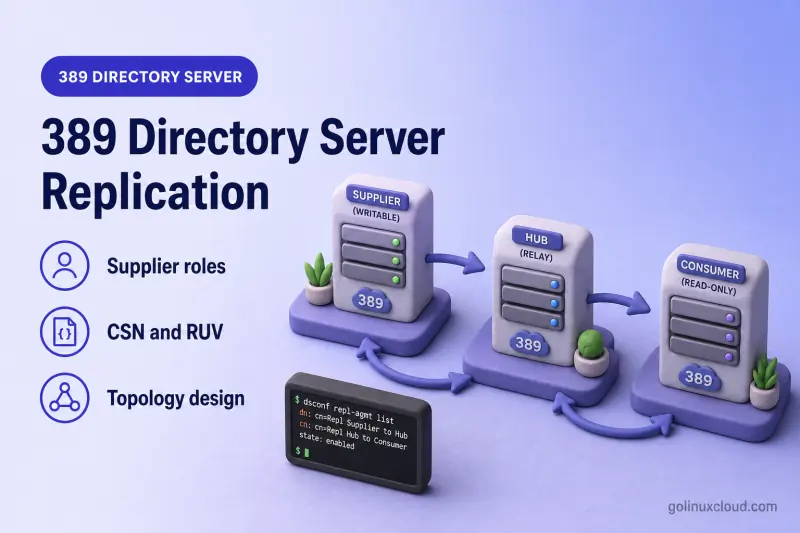
389 Directory Server replication keeps the same directory data available on more than one instance. You use it for read scaling, geographic distribution, redundancy, and write availability in multi-supplier designs. Replication is asynchronous, eventually consistent, and configured per suffix. It is not a backup and does not automatically move LDAP clients to another host when one server fails.
This page is a conceptual guide and topology decision framework. It explains roles, metadata, topology types, and design trade-offs before you create agreements or initialize replicas. For instance layout and LDAP request flow, start with 389 Directory Server architecture. For agreement commands, see dsconf commands.
Tested on: Rocky Linux 10.2; 389 Directory Server 3.2.0.
What is 389 Directory Server replication?
Replication copies directory entry changes between Directory Server instances that share a replicated suffix such as dc=example,dc=com. One instance accepts a modify operation, records the change, and later pushes it to replicas configured through replication agreements.
Replication helps you:
- Spread read traffic across local or remote replicas
- Keep directory data in more than one data center
- Survive the loss of one read-only replica without rebuilding the entire tree from scratch
- Accept writes on more than one supplier when you choose a multi-supplier topology
Replication does not:
- Replace backup and restore — accidental deletes and some schema mistakes can replicate everywhere
- Guarantee that every replica returns identical search results at every instant
- Redirect LDAP clients when a host stops responding — that requires DNS, a load balancer, or application logic
Legacy documentation often used master and slave or multi-master. Current 389 Directory Server documentation uses supplier, consumer, hub, and multi-supplier. This article uses the current terms; master-slave and multi-master appear only where older material or search phrasing requires them.
Replication terminology and server roles
Replica
A replica is a copy of directory data for a given suffix on one instance. The replica role (supplier, consumer, or hub) describes how that copy participates in the topology.
Supplier
A supplier holds a writable replica for the suffix, accepts client updates (or receives them from another supplier in multi-supplier designs), maintains a replication changelog, and initiates replication to remote replicas through agreements.
Consumer
A consumer holds a read-only replica. It receives updates from suppliers and can answer search requests. When a client sends an add, modify, or delete, the consumer refers the operation to a supplier unless you use a read-only mode that rejects updates entirely.
Hub
A hub is a hybrid role used in cascading replication. It receives updates from an upstream supplier, keeps a read-only replica, maintains its own changelog, and forwards updates to downstream consumers. Hubs reduce the number of direct connections to primary suppliers and are common for remote sites.
Replication agreement and replication manager
A replication agreement describes replication from one supplier to one remote replica. You create the agreement on the supplier; the supplier always initiates the replication session.
The replication manager (or equivalent bind identity) is the account the supplier uses to authenticate to the consumer or hub during replication. That entry must exist on the destination and hold the access required to apply replicated updates.
| Role | Accepts client writes | Maintains changelog | Receives updates | Forwards updates |
|---|---|---|---|---|
| Supplier | Yes | Yes | Yes (from other suppliers in multi-supplier) | Yes (to consumers and hubs) |
| Hub | No (refers writes) | Yes | Yes | Yes (to downstream consumers) |
| Consumer | No (refers writes) | No | Yes | No |
How 389 Directory Server replication works
389 Directory Server uses supplier-initiated replication. The consumer or hub never pulls changes on its own schedule; the supplier connects according to the agreement and changelog state.
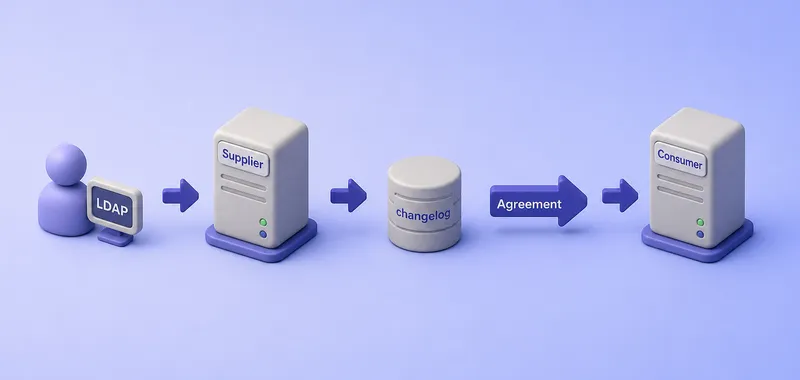
The figure summarizes the steady-state path for an incremental update:
- An LDAP client sends a modify operation to a supplier.
- The supplier applies the change to its local database and records it in the replication changelog.
- The supplier opens a replication session to the consumer defined in the agreement (using the replication manager bind).
- The supplier sends the change; the consumer applies it and updates its RUV.
Initial replication (initialization) copies the suffix database and replication metadata before incremental updates can flow. Initialization is a separate operational step from creating the agreement. See initialize and reinitialize replicas for total update procedures and restore a replicated server for rebuild scenarios that depend on initialization.
Replication metadata and internal components
Replica ID
Every supplier for a replicated suffix requires a unique replica ID from 1 through 65534. Consumers and hubs use the reserved replica ID 65535; current dsconf versions assign it automatically when you enable the consumer or hub role.
Replica IDs identify which supplier originated a change. Duplicate replica IDs for the same suffix break replication metadata and make conflict analysis unreliable. Plan replica ID allocation before you enable suppliers in production.
Change Sequence Number (CSN)
A Change Sequence Number timestamps and orders replicated changes. Each CSN is tied to the originating supplier replica ID. Directory Server uses CSNs to decide whether an update is newer than data already stored on a replica and to resolve some concurrent-update cases in multi-supplier topologies.
Replica Update Vector (RUV)
The Replica Update Vector summarizes replication state for a suffix. For each supplier that has contributed changes, the RUV records the supplier LDAP URL, replica ID, and minimum and maximum CSNs seen on the local server.
Operators inspect RUV data when a replica is offline for a long time, when removing a server from the topology, or when diagnosing lag. On a running supplier, run date and get-ruv together so you can compare wall clock to the Max CSN lines and to the hex values in parentheses:
date
date -u
dsconf -D "cn=Directory Manager" -y /root/dm.pw ldap2 replication get-ruv --suffix "dc=example,dc=com"
Sample output from the ldap2 supplier in a multi-supplier lab:
Sun Jul 19 12:45:45 PM IST 2026
Sun Jul 19 07:15:45 AM UTC 2026
RUV:        {replica 2 ldap://ldap2.example.com:1389}
Replica ID: 2
LDAP URL:   ldap://ldap2.example.com:1389
Min CSN:    1970-01-01 00:00:00 (00000000000000000000)
Max CSN:    1970-01-01 00:00:00 (00000000000000000000)

RUV:        {replica 1 ldap://ldap1.example.com:389} 6a5b1207000000010000 6a5be547000000010000
Replica ID: 1
LDAP URL:   ldap://ldap1.example.com:389
Min CSN:    2026-07-18 05:41:27 (6a5b1207000000010000)
Max CSN:    2026-07-18 20:42:47 (6a5be547000000010000)
Replica ID 2 shows placeholder CSNs until that supplier records its first update after initialization. Each block is one supplier's progress as seen on this server. The minimum and maximum values identify the first and latest CSNs represented for that supplier in the local RUV. They do not directly show the changelog retention window or current replication lag.
Replication changelog
The changelog is a supplier-side (and hub-side) journal of updates that must be replayed to downstream replicas. Suppliers and hubs retain changelog data so offline consumers can catch up incrementally after they return.
An offline replica can usually catch up while the supplier still holds every CSN it requires. With age-based trimming, Directory Server normally retains changes until all direct consumers have received them, which can cause the changelog to grow during a long outage. Reinitialization is required when the replica requests CSNs that are no longer available—for example, after forced trimming, topology changes, restoring an outdated replica, or loss of required changelog data. Changelog retention and disk sizing belong in monitoring and capacity planning, not in ad hoc troubleshooting alone.
Replication topology types
The three common layout patterns differ in where writes land, how many changelogs you maintain, and how many replication hops remote sites see.
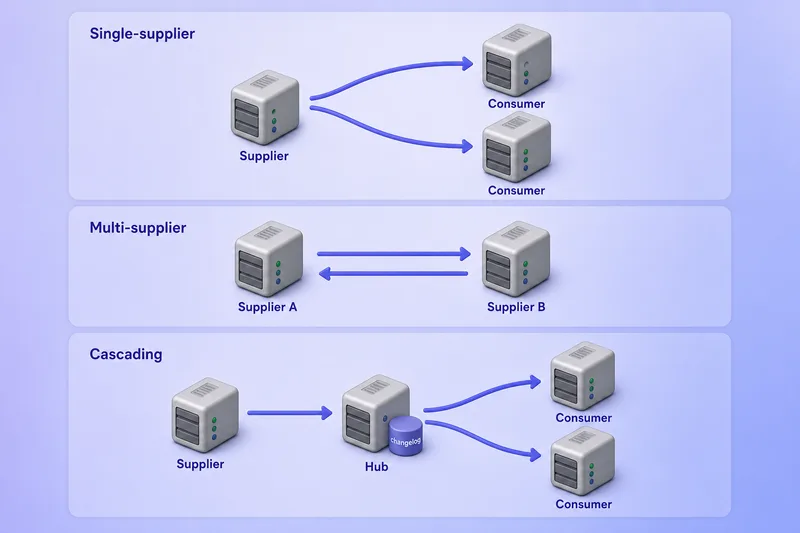
Hybrid designs mix these patterns per suffix; the comparison table below captures write availability and agreement count without redrawing every branch.
Single-supplier replication
One writable supplier replicates to one or more read-only consumers.
Benefits:
- Simple write path — every modify goes to one known supplier
- Lower conflict risk — no concurrent writes on multiple suppliers
- Fewer agreements than a full multi-supplier mesh
Limitations:
- The supplier is a single write choke point
- Supplier maintenance or failure blocks writes until the supplier returns, or until you promote a consumer and direct write clients to the newly writable replica.
- Consumers do not accept writes
Choose single-supplier replication when writes are centralized and most clients perform searches.
Multi-supplier replication
Two or more suppliers accept writes for the same suffix. In a two-supplier topology, create one agreement in each direction. Larger deployments can use a fully connected mesh or a partly connected topology, provided changes still have valid paths between suppliers. For a full mesh containing n suppliers, the directed agreement count is n(n−1).
Benefits:
- Write availability when one supplier is unreachable
- Geographic write locality when applications bind to the nearest supplier
Trade-offs:
- Eventual consistency — replicas can temporarily disagree
- More agreements and monitoring complexity
- Concurrent updates can produce conflicts that Directory Server must resolve automatically
- All suppliers need synchronized clocks and unique replica IDs
Legacy multi-master is the older name for this pattern. Current documentation calls it multi-supplier replication.
Cascading replication
A supplier replicates to a hub; the hub forwards updates to one or more consumers. The hub holds a read-only replica but maintains a changelog.
Use cascading replication when:
- Remote consumers should not maintain VPN or firewall paths to every primary supplier
- One hub should fan out updates to many branch-office consumers
- You want to reduce replication connection load on the primary supplier
Costs:
- Extra replication hop adds latency
- Hub failure affects every downstream consumer until you reroute agreements or promote another server
Hybrid replication topology
Many production designs combine patterns: a multi-supplier core in the primary data center, read-only consumers for application tiers, and hubs plus consumers for remote sites. The hybrid approach is normal, not a separate product mode — you compose suppliers, hubs, and consumers per suffix.
Red Hat Directory Server supports up to 20 suppliers in one replication environment, with unlimited hubs and consumers. More suppliers do not automatically mean a better design.
| Topic | Single-supplier | Multi-supplier | Cascading |
|---|---|---|---|
| Writable replicas | One supplier | Two or more suppliers | One or more suppliers; hub is not writable |
| Read scalability | Consumers scale reads | Suppliers and consumers scale reads | Hub and consumers scale reads downstream |
| Write availability | Single point for writes | Writes survive loss of one supplier | Writes still land on suppliers; hub does not accept writes |
| Changelog required | On supplier | On every supplier | On supplier and on hub |
| Typical agreement count | Low | Higher; often bidirectional pairs | Supplier→hub plus hub→consumer per branch |
| Conflict possibility | Low | Yes, with concurrent writes | Low on hub; multi-supplier core still conflicts if present |
| WAN suitability | Good with local consumers | Good when suppliers are peered | Good for many remote consumers |
| Administrative complexity | Lowest | Highest | Medium |
| Recommended use case | Centralized writes, read-heavy apps | Write locality and supplier redundancy | Remote read replicas without direct supplier links |
What data is and is not replicated?
Suffix replication moves directory entries and related operational state; instance configuration stays local unless you automate it separately.
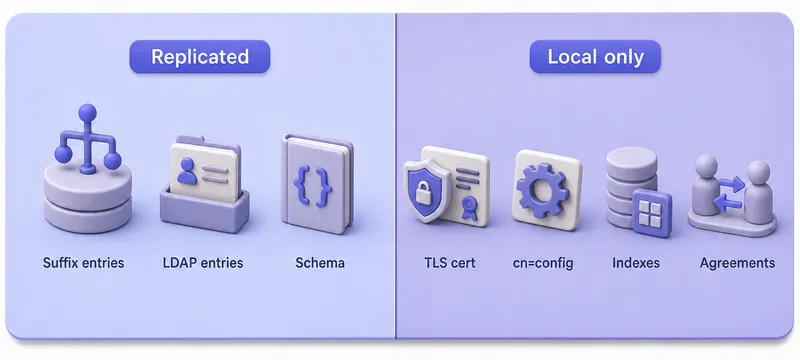
Agreement definitions, TLS material, and cn=config plug-ins are a common source of drift when operators assume a healthy replica implies identical server behaviour.
Replicated directory data
Replication operates on a per-suffix basis. Data in the replicated backend travels with the suffix, including:
- LDAP entries and attributes under the suffix
- Add, modify, delete, and modrdn operations
- Operational attributes required for replication state
- Schema updates made through
dsconf, the web console, LDAP modify operations, or99user.ldifreplicate by default. Maintain schema on one designated supplier. Separate custom schema files other than99user.ldifdo not replicate automatically and must be copied consistently to every server.
Replication is configured independently for each suffix/database pair. If a sub-suffix is stored in a separate backend, replicating the parent suffix does not automatically replicate that sub-suffix; enable and initialize replication for it separately. Confirm backend and mapping-tree layout in suffixes and backends before you mix replicated and non-replicated branches.
Server-local configuration
These items are not magically synchronized just because directory entries replicate:
- TLS certificates and NSS databases
- Server tuning, log settings, and operating-system configuration
- Index definitions and backend cache sizes
- Plug-in configuration under
cn=config - Replication agreements themselves — you configure each direction explicitly
Fractional replication lets you exclude selected attributes per agreement. Agreement-level exclusions are useful for derived or locally calculated attributes; configuration procedures belong in the dedicated fractional-replication chapter.
Treat each instance as having its own configuration lifecycle. Automate configuration with your standard change-management process or configuration management tools.
Consistency, conflicts, and failure behavior
Eventual consistency
After a write completes on one supplier, other replicas receive the change asynchronously. A client that immediately reads from another replica may not see the update until replication finishes. Latency grows with network distance, server load, and the number of replication hops.
Keep clocks synchronized on every Directory Server host, especially writable suppliers. Directory Server uses system time when generating CSNs and resolving concurrent changes. Excessive skew can cause replication sessions to abort, while smaller inaccuracies can produce unexpected conflict-resolution results.
Concurrent updates and replication conflicts
In multi-supplier topologies, two suppliers can update the same entry before replication converges. Directory Server applies automatic conflict resolution rules based on CSNs and attribute semantics. Naming conflicts, orphaned entries, and ambiguous merges still require operator attention.
This article introduces conflict behavior only. Resolution procedures, plug-in exclusions, and attribute-level policies belong in a dedicated conflict-handling chapter.
Offline replicas and changelog retention
When a consumer or hub returns online, the supplier replays changelog records the replica missed. An offline replica can usually catch up while the supplier still holds every CSN it requires. With age-based trimming, Directory Server normally retains changes until all direct consumers have received them, which can cause the changelog to grow during a long outage. Reinitialization is required when the replica requests CSNs that are no longer available—for example, after forced trimming, topology changes, restoring an outdated replica, or loss of required changelog data.
Replication and client failover
Replication keeps data convergent; it does not publish a single virtual IP or health-checked LDAP endpoint. Applications need:
- Multiple LDAP URLs in client configuration
- DNS names that resolve to healthy instances
- Load balancers with LDAP-aware health checks where appropriate
Account lockout and password policy state may also need replication-aware testing when clients round-robin across suppliers.
How to choose a replication topology
Choose single-supplier replication when
- One team or application tier owns all writes
- Read-only replicas satisfy scalability requirements
- You want the simplest agreement layout and the lowest conflict surface
Choose multi-supplier replication when
- Applications in more than one site must write locally
- Supplier-level redundancy for writes is a requirement
- Operations can monitor lag, RUV health, and conflicts across suppliers
Choose cascading replication when
- Branch consumers cannot connect directly to core suppliers
- A hub should distribute updates to many downstream servers
- You accept an extra hop in exchange for simpler firewall rules
Topology design checklist
Before you run dsconf replication enable, document:
- Number and location of writable suppliers
- Read-to-write ratio and peak modify rate
- LAN versus WAN links between sites
- Required write availability and acceptable replication lag
- Total replication agreements (count each direction separately)
- Initialization order — consumers and hubs need a current source before incremental replication
- Replica ID allocation table per suffix
- TLS, certificate trust, and replication manager credentials
- Monitoring, backup, and recovery plans independent of replication
Common replication architecture mistakes
| Mistake | Why it hurts |
|---|---|
| Reusing a supplier replica ID | Corrupts CSN and RUV metadata for the suffix |
| Treating replication as backup | Propagates accidental deletes, invalid LDAP changes, and some schema mistakes; provides no earlier recovery point and does not protect against every corruption or infrastructure failure |
| Full-mesh agreements without need | Adds agreements, threads, network traffic, server load, and operational complexity without guaranteed benefit |
Assuming cn=config replicates |
Leaves indexes, TLS, and plug-ins inconsistent across hosts |
| Multi-supplier without clock sync | Can distort CSN ordering, affect conflict resolution, and abort replication sessions when skew exceeds the permitted limit |
| Ignoring changelog retention | Can force reinitialization when required CSNs are no longer available, or allow the changelog to grow while a lagging consumer blocks trimming |
| Expecting automatic LDAP failover | Clients keep using a failed host unless you engineer redirection |
| Extra writable suppliers | Adds conflict risk without business benefit |
Next steps
Use this architecture page to pick roles and topology first. Then follow the procedural chapters in the 389 Directory Server tutorial hub:
| Topic | Where to go next |
|---|---|
| Single-supplier supplier and consumer setup | Configure single-supplier replication |
| Supplier → hub → consumer cascading layout | Configure cascading replication |
Replication agreements and dsconf repl-agmt |
Manage replication agreements |
Other dsconf replication settings |
dsconf commands — replication section |
| Build replication during migration | Migrate 389 Directory Server to a new server |
| Reinitialize or recover a replica | Restore a replicated server |
| Verify lag and entry differences | ds-replcheck (used in migration and restore chapters above) |
| Backups independent of replication | Back up and restore 389 Directory Server |
| Schema changes in replicated deployments | Custom schema |
For hands-on configuration, see Configure single-supplier replication, Configure cascading replication, and Configure multi-supplier replication. For agreement lifecycle tasks after topology setup, see Manage replication agreements. To change an existing replica between consumer, hub, and supplier roles, see promote or demote a replica. For certificate-based replication authentication, see Secure replication with certificate-based authentication. Advanced monitoring and conflict resolution chapters remain planned in the course replication group.
References
- 389 Directory Server documentation
- Red Hat Directory Server 13 — designing the replication process
- Red Hat Directory Server 13 — configuring and managing replication
- Red Hat Directory Server 13 — cascading replication
Summary
389 Directory Server replication copies suffix data between instances through supplier-initiated agreements. Suppliers write and maintain changelogs; consumers serve read-only copies; hubs forward updates in cascading designs. Replica IDs, CSNs, and RUVs track progress and ordering. Single-supplier topologies are simplest; multi-supplier topologies add write availability at the cost of eventual consistency and conflict handling; cascading topologies reduce direct links to remote consumers. Replication improves availability and read scale but does not replace backups or client failover — plan agreements, initialization, monitoring, and recovery before you enable production traffic.
